Light Up Your Feed: The Ultimate Night Party Social Media Template
You know the feeling. The venue is booked, the playlist is curated, and the vibe is set, but as the event date approaches, your social media feed remains frustratingly silent. Promoting a nightlife event, a corporate mixer, or a birthday bash requires a specific visual language—one that screams energy, excitement, and exclusivity. Too often, entrepreneurs and event planners find themselves stuck between hiring an expensive graphic designer and using generic, uninspired online generators that make their event look amateurish. There is a middle ground that combines professional polish with total creative control: the Night Party Social Media Post Template. This isn't just a static image; it is a dynamic framework designed to capture the neon-lit, high-energy atmosphere of a modern celebration, allowing you to generate hype without the design headache.
Capturing the Vibe: Why Visuals Matter in Event Marketing
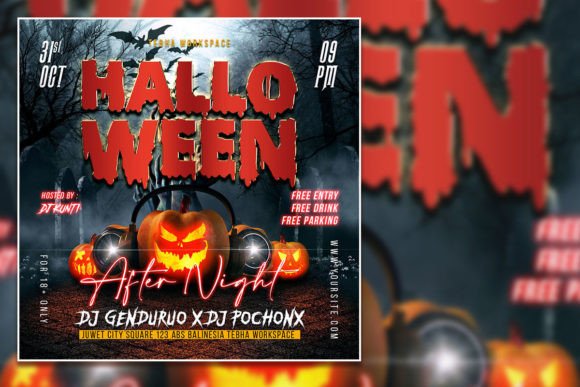
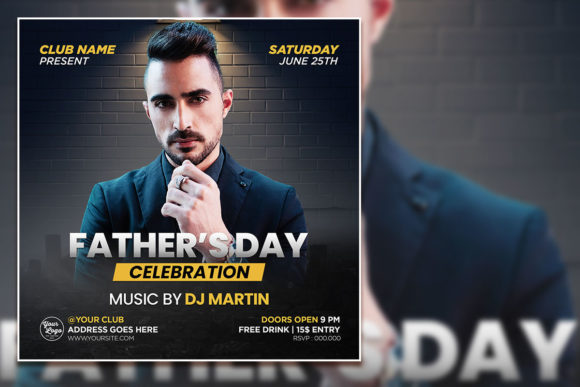
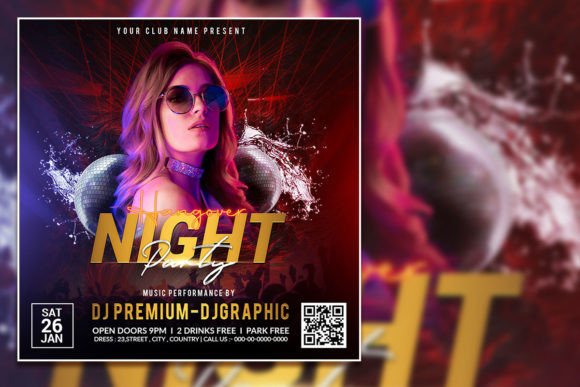
In the crowded digital landscape of Instagram stories and Facebook feeds, a user decides whether to stop scrolling in less than three seconds. For a night event, your imagery needs to do the heavy lifting of communicating the mood instantly. A successful design asset relies on modern typography and a high-contrast color palette to evoke the feeling of a dark room lit by spotlights or neon signs. This specific Editable Party flyer template leverages that aesthetic perfectly. It is built with organized layers in Adobe Photoshop, meaning you have granular control over every element. Unlike rigid online editors, a PSD file allows you to manipulate lighting effects, blend modes, and layer opacity to create a truly immersive look. Whether you are a small business owner promoting a "Happy Hour" or a content creator hosting a launch party, the ability to customize these elements ensures your brand identity remains front and center.
Practical Applications: Beyond the Instagram Post
While the name suggests a social media focus, the versatility of a high-resolution template extends far beyond a single Instagram square. Because the file is sized at 2000 x 2000 pixels with a 300 dpi resolution, the print quality is impeccable. This opens up a world of possibilities for physical marketing materials. Imagine taking the same design used for your Facebook event cover and repurposing it for:
- High-Quality Print Flyers: Perfect for handing out at local venues, coffee shops, or college campuses.
- Event Invitations: Send digital or physical invites that look premium and exclusive.
- In-Venue Signage: The high resolution ensures your graphics look sharp on screens or printed posters at the registration desk.
- Merchandise Mockups: Use the design elements to create branded stickers or wristbands.
- Email Headers: Crop and adapt the design to fit newsletter headers for your digital marketing campaigns.
This adaptability is crucial for maintaining visual consistency. When your digital ads match your physical flyers, you build brand recognition. Customers begin to associate that specific color scheme and typography style with your business, reinforcing your professional presentation across every touchpoint.
Mastering the Edit: A Guide for Non-Designers
One of the biggest hurdles for entrepreneurs is the fear of complex software. However, the structure of this Modern Party Editable PSD Template is designed with user-friendliness in mind. You do not need to be a Photoshop wizard to create something stunning. The file utilizes Organized Layers, which means every piece of text, every background element, and every graphic is separated and labeled.
Here is the practical workflow for making this template your own:
- Open in Adobe Photoshop: Ensure you have the software installed.
- Locate the Text Layers: In the layers panel, look for the folders labeled "Text." Using the Text Tool, simply click on the headline or details to select them.
- Customize Your Message: Replace the placeholder text with your event details. This is where you inject your personality. If the current font style doesn't match your brand, you can easily swap it out. Just highlight the text and choose a sans serif font for a clean, modern look, or a script font for a more elegant, VIP feel.
- Swap the Imagery: You can replace the photo with your photo for an even more customized look. Simply drag and drop your high-quality image into the designated smart object layer.
This level of customization ensures that the final product doesn't look like a "template." It looks like a bespoke design asset created specifically for your brand. It bridges the gap between professional graphic design and DIY marketing.
Design Strategy: Matching Typography to the Occasion
The typography you choose sends a subconscious signal to your audience. A Night Party Flyer Template usually demands a bold, impactful display font to grab attention, but the supporting text needs to be legible. This is where understanding font pairing becomes a superpower. If you use a highly stylized, decorative font for the word "Party," ensure your date, time, and location are written in a clean, readable sans serif font.
Consider the hierarchy of information. Your audience needs to know what it is, when it is, and where it is. A common mistake in event marketing is sacrificing readability for style. While a dripping, grunge-style typeface might look cool, if people can't read the address of the venue, they won't show up. Use this template to test different font pairings. Try a strong, geometric headline font paired with a lightweight body text. This contrast creates a visual rhythm that guides the viewer's eye naturally from the headline down to the call-to-action.
Maximizing Engagement with the Right Assets
Ultimately, the goal of any marketing asset is engagement. A visually striking post stops the scroll, but a cohesive brand experience drives the click. By using this Party Celebration Flyer Template, you are not just sharing information; you are selling an experience. The high-energy visuals promise a good time, while the professional layout assures potential attendees that the event is well-organized.
For content creators and marketers, having a library of design assets like this is a time-saver. Instead of starting from a blank canvas every week, you can create a series of posts leading up to the event. Use the template for the "Save the Date" announcement, the "Lineup Reveal," and the "Final Tickets Available" urgency post. By keeping the core design elements consistent but changing the focal points, you create a campaign narrative that builds anticipation. This approach to visual communication transforms a simple flyer into a powerful tool for audience growth and event success.