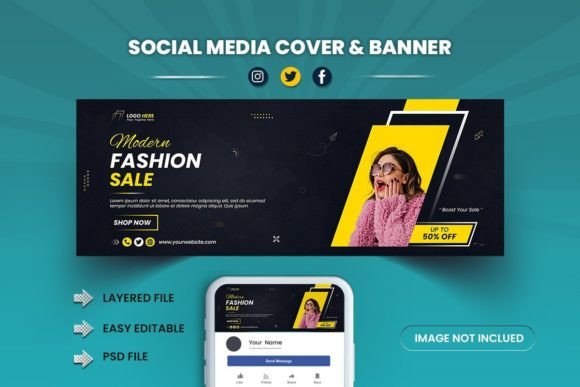
Designing a High-Converting Fashion Sale Social Media Cover
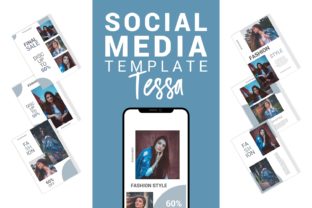
Scrolling through a crowded feed, what stops you in your tracks? It’s rarely a generic stock photo or a wall of text. For fashion brands, it’s that perfect blend of urgency, style, and clarity—a visual hook that promises a deal worth clicking. Creating that hook consistently, especially during a fast-paced sale, is where a well-designed Fashion Sale Social Media Cover & Banner becomes your most valuable marketing asset. It’s the digital storefront window, the first impression that can turn a casual browser into a committed customer.
The Anatomy of a Standout Sales Banner
A powerful sales banner does more than announce a discount. It embodies the brand’s aesthetic while driving action. Think about the key elements that make a Fashion Sale Social Media Facebook Cover & banner Template effective. It needs a clear visual hierarchy: your sale message (like “50% Off”) must be the star, supported by a compelling product image and your logo. The color palette should reflect your brand but also use contrast to make the offer pop—think a crisp white text overlay on a dark, moody fashion shot, or a bold, bright accent color that screams “SALE.”
This is where a professional template shines. A file sized perfectly at 1704 x 632 pixels ensures your design displays crisply on Facebook without awkward cropping. The real magic, however, is in its editable nature. A layered Photoshop (PSD) file gives you control. You’re not locked into the designer’s original color scheme or product shot. You can swap in your own hero product, adjust the typography to match your brand fonts, and tweak the layout to suit your specific campaign. This flexibility is crucial for maintaining visual consistency across all your marketing, from Instagram Stories to your website’s sale page.
Beyond the Flash Sale: Versatile Branding Applications
While the immediate use is obvious, a well-crafted template’s value extends far beyond a weekend promotion. Consider it a foundational piece of your brand identity toolkit. The same design principles that make a great sale banner apply to other critical touchpoints.
- Seasonal Campaigns: Easily adapt the template for holiday sales, end-of-season clearances, or new collection launches by changing the imagery and copy.
- Event Promotion: Hosting a virtual styling session or an in-store pop-up? The banner’s structure is perfect for promoting dates and details.
- Consistent Content: Use the design language to create matching Instagram post graphics, Pinterest pins, or email headers, ensuring a cohesive look that strengthens brand recognition.
- Digital & Physical Assets: The clean, professional aesthetic can inspire the design for print materials like in-store signage, packaging inserts for orders, or even merchandise tags.
This approach moves you from creating one-off graphics to building a scalable system. When your social media cover, your website’s hero banner, and your email newsletter all share the same visual DNA, you present a unified, professional front. This consistency builds trust and makes your brand instantly recognizable, which is invaluable in a saturated market.
Practical Steps for Customization and Impact
Getting the most out of a template requires a bit of strategy. First, gather your assets. Have your best product photos ready—high-resolution, well-lit images that showcase the items on sale. Next, define your key message. Is it a percentage discount, a “Buy One, Get One” offer, or a limited-time flash sale? Your headline should be short and scannable.
When you open the PSD file, focus on these edits:
- Text & Typography: Replace placeholder text with your sale message. Check the included font (often a free, commercial-friendly one) and see if it aligns with your brand. If not, swap it for a premium font from your collection. Pay attention to readability—a stylish script font might be beautiful but could fail at small sizes. Often, a clean sans serif font for the offer details paired with a stylish serif font or display font for the headline creates a perfect font pairing.
- Color & Imagery: Use the color picker to match your brand’s hex codes. Replace the background image with your own product shot. A pro tip: use a clipping mask to neatly place your product within the design’s existing layout frames.
- Brand Elements: Don’t forget to add your logo. Place it strategically—usually top or bottom corner—where it’s visible but doesn’t compete with the sale message.
After editing, preview the banner at 100% zoom. Check for any typos, ensure all elements are aligned, and confirm the text is legible against the background. A little time spent on these details transforms a generic template into a powerful, on-brand marketing asset that can genuinely boost engagement and drive traffic to your store.
Integrating Design Assets into Your Workflow
For the small business owner or solo content creator, time is a precious resource. Starting every design from scratch is unsustainable. Investing in high-quality, editable design assets like this Fashion Sale template is a smart workflow decision. It provides a professional starting point, freeing you to focus on strategy and content rather than struggling with basic layout and composition.
Think of it as building a library. Over time, you can collect templates for different purposes: one for sales, another for new arrivals, a third for customer testimonials. This library becomes your secret weapon for maintaining a consistent, professional, and engaging social media presence. It allows you to produce social media graphics that look like they were made by a dedicated design team, helping you compete with larger brands and capture the attention your business deserves. The goal isn’t just to have a pretty picture—it’s to create a visual tool that works as hard as you do.