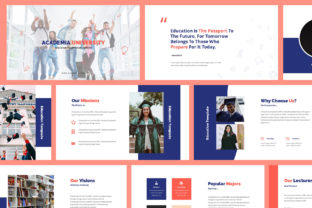
Modernizing Academic Presentations with a Clean Template
Let’s be honest: most academic and educational presentations are visually stale. We’ve all sat through lectures or keynote speeches where the slides are cluttered with outdated clipart, jarring color schemes, and walls of text that make you want to check your phone. In the professional world—whether you are defending a thesis, pitching a curriculum change, or presenting research at a conference—your visual communication is just as important as your data. If your slides look amateur, your audience might subconsciously question the credibility of your work. This is why having a solid design foundation is crucial. It allows the audience to focus on the content rather than being distracted by bad design choices. A template like the Academia Education Keynote Template is designed to solve this specific problem by providing a minimalist, modern canvas that prioritizes clarity and professionalism.
Why Minimalism Works for Educational Contexts
In the realm of design assets, "minimalist" often gets confused with "boring." However, in the context of a university setting or a corporate training environment, minimalism is your best friend. The Academia Education Keynote Template utilizes a flat design element strategy. Flat design strips away the shadows, bevels, and 3D effects that clutter up a screen, focusing instead on clean lines and functional aesthetics. This approach is vital for readability. When you are displaying complex graphs, architectural plans, or dense theoretical frameworks, you need a background that supports the information rather than competing with it.
The visual appeal of this specific Keynote template lies in its adaptability. It comes with an easy-to-change color system, which is a massive time-saver. Instead of manually recoloring every shape and text box—a nightmare for anyone who has tried it—you can adjust the master slides to align with your institution’s branding or your personal brand identity in seconds. Whether you are a designer creating a deck for a client or a professor updating your course material, this flexibility ensures that the final product feels cohesive and intentional.
Practical Applications Beyond the Lecture Hall
While the name suggests a focus on schools, the utility of a high-quality presentation template extends far beyond the classroom. If you are a small business owner or a creative entrepreneur, the structure of the Academia Education Keynote Template is perfectly suited for a variety of marketing assets and visual communication needs. Think about the last time you needed to create a pitch deck for investors or a workshop for your community. You need a design that screams "competence."
Here are a few ways this template can be repurposed for different commercial and creative needs:
- Brand Guidelines Decks: Use the clean layouts to present your brand strategy, logo design variations, and typography choices to clients. The pixel-perfect design ensures your mockups look sharp on Retina and Full HD screens.
- Corporate Training Modules: For businesses, employee onboarding or skill-building workshops require a professional look. The object placeholders make it easy to insert diagrams and organizational charts without breaking the layout.
- Startup Pitch Decks: Investors appreciate brevity and clarity. The widescreen format and fully animated slides allow you to reveal information progressively, keeping the audience engaged without overwhelming them.
- Digital Product Launches: If you are selling an ebook or an online course, you can use this template to create a promotional video or a webinar presentation that looks high-end and polished.
Streamlining Your Workflow with Smart Design Features
One of the biggest pain points in design is the technical barrier. You might have a great idea, but if the software fights you at every turn, the creative process stalls. This is where the technical inclusions of the Academia Education Keynote Template shine. It is built on layouts based on Master Slides. For the uninitiated, Master Slides are the "master control" for your presentation. By editing the master, you can globally change fonts, move logos, or adjust layouts across 30+ slides instantly. This is a non-negotiable feature for anyone working under a deadline.
Furthermore, the template includes resizable vector elements. This is a game-changer for print materials and posters. Unlike rasterized images (like JPEGs) that become blurry when you enlarge them, vector elements can be scaled to the size of a billboard or a poster without losing quality. If you need to take a slide from your digital presentation and turn it into a printed handout or a social media graphic, these elements ensure your design remains sharp and professional. The inclusion of a PDF documentation file also means you aren’t left guessing how to use these features; the guide walks you through the process, making it accessible even for those with limited Keynote experience.
Typography and Visual Consistency
Typography is the voice of your design. A common mistake in presentations is using too many fonts or using fonts that are difficult to read from the back of a room. The Academia Education Keynote Template comes pre-loaded with a recommended free font system—Raleway and Open Sans. These are excellent choices for modern typography.
- Raleway is a elegant sans-serif font often used for headers. It has a distinct personality that feels sophisticated yet approachable.
- Open Sans is a humanist sans-serif font known for its incredible readability at smaller sizes, making it perfect for body text and bullet points.
By sticking to these curated font pairings, you maintain visual consistency throughout your presentation. This consistency builds trust with your audience. When the typography aligns with the content—clean, modern, and direct—it reinforces the message that you are organized and detail-oriented. Whether you are presenting a research paper or a marketing plan, these fonts ensure that your text is legible on projectors, monitors, and mobile devices alike.
Final Thoughts on Professional Presentation
In a world where attention spans are short, the visual layer of your presentation carries a heavy burden. You don’t need to be a graphic design wizard to create slides that look like they were made by a professional agency. Tools like the Academia Education Keynote Template bridge the gap between amateur and pro. By leveraging the overlay picture effects, the animation capabilities, and the print-ready settings, you can transform a mundane speech into a memorable visual experience.
Instead of spending hours wrestling with alignment and formatting, you can download a solution that handles the heavy lifting. This frees up your most valuable resource: time. Use that time to refine your narrative, practice your delivery, and engage with your audience. After all, the best slides are the ones that support a great speaker, not the ones that distract from them. With the right tools in your arsenal, every presentation becomes an opportunity to showcase your ideas with the clarity and professionalism they deserve.